
Internet speed for IPTV streaming has become one of the most popular issues to watch live TV, sports, movies, and international channels online. However, one of the biggest problems IPTV users experience is buffering, freezing, or poor video quality. In most cases, internet speed plays a major role in overall streaming performance.
Whether you stream on a Firestick, Smart TV, Android box, or mobile device, understanding the right internet speed for IPTV can help you enjoy smoother playback and fewer interruptions during live events.
In this guide, we explain the recommended internet speeds for IPTV streaming, how different devices affect performance, and practical tips to reduce buffering during live sports and peak viewing hours.
Minimum Internet Speed for IPTV
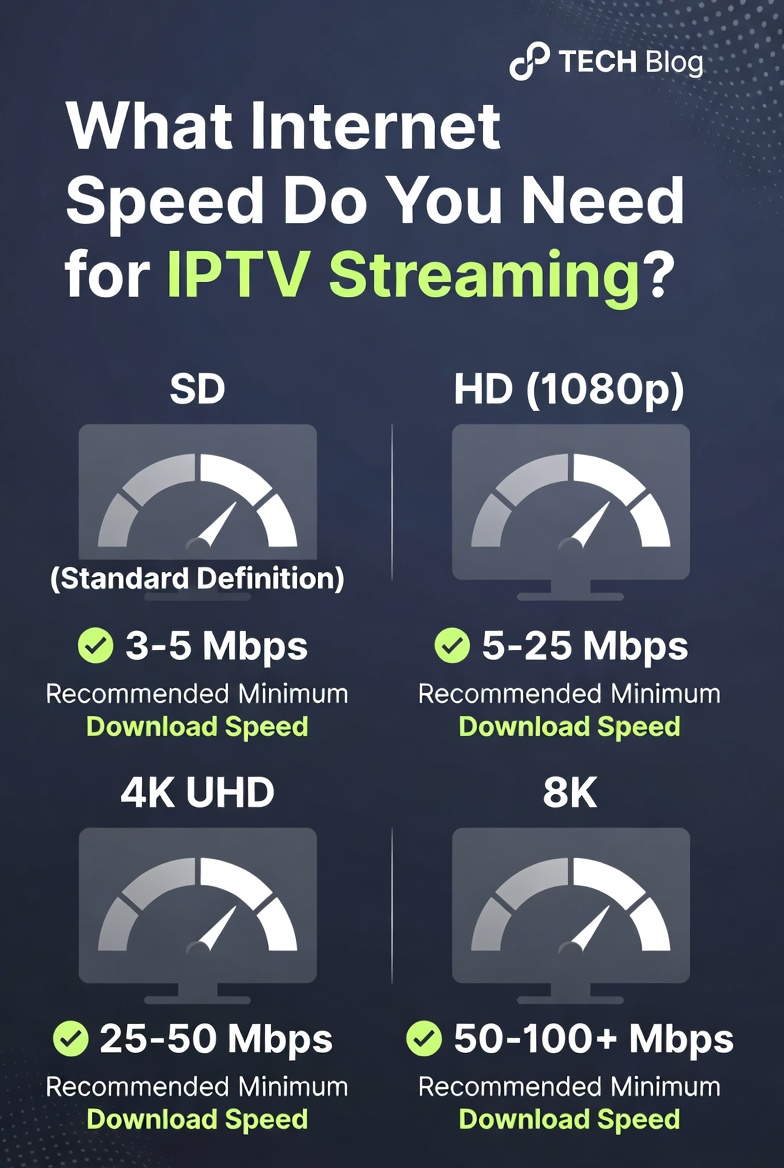
The internet speed required for IPTV depends mainly on the quality of the stream you are watching. Lower-quality streams consume less bandwidth, while HD and 4K streams require a faster and more stable connection.
Here is a general guideline:
| Streaming Quality | Recommended Speed |
|---|---|
| SD Streaming | 5 Mbps |
| HD Streaming | 10–15 Mbps |
| Full HD Streaming | 20 Mbps |
| 4K IPTV Streaming | 30–50 Mbps |
While some IPTV services may work on slower speeds, stable performance is usually more important than raw speed alone. A fast connection with poor stability can still cause freezing and buffering.
If you are new to IPTV streaming, you can also check our complete IPTV SETUP GUIDE for device installation instructions and streaming recommendations.
Why IPTV Buffers During Live Sports
Many IPTV users notice that buffering becomes worse during football matches, UFC events, Formula 1 races, and other major live broadcasts. This usually happens because thousands of viewers are streaming at the same time.
During peak hours, several factors can affect IPTV performance:
- Internet congestion
- Weak Wi-Fi signals
- Slow IPTV servers
- Background downloads
- Overloaded streaming devices
Live sports require consistent real-time streaming. Even small interruptions in internet stability can lead to freezing or delayed playback.
If you frequently experience these issues, reading our guide on IPTV buffering and streaming optimization can help improve performance across multiple devices.
Wi-Fi vs Ethernet for IPTV Streaming
One of the biggest mistakes IPTV users make is relying entirely on weak Wi-Fi connections. Although Wi-Fi is convenient, Ethernet connections are generally more stable for IPTV streaming.
Ethernet Connection Advantages
- More stable speeds
- Lower latency
- Reduced buffering
- Better for 4K streaming
- Stronger performance during live sports
Wi-Fi Connection Advantages
- Easier setup
- No cables required
- Better mobility
- Convenient for mobile devices
If your router is far from your streaming device, you may experience poor signal strength and unstable playback. In such cases, moving closer to the router or using an Ethernet adapter can significantly improve IPTV streaming quality.
Best Internet Speeds for Live Sports Streaming
Sports streaming places heavier demands on your internet connection compared to regular TV channels. Football matches and other live events require continuous data delivery without interruption.
For smoother live sports streaming, most users should aim for:
- 20 Mbps minimum for HD sports
- 50 Mbps or higher for 4K sports streaming
- Stable low-latency connections
- Limited background downloads
Households with multiple connected devices may require even higher speeds. For example, if several people are streaming Netflix, gaming online, or downloading files simultaneously, IPTV performance can suffer.
Why IPTV Buffers Even With Fast Internet
Many users assume that having fast internet automatically guarantees smooth IPTV streaming. Unfortunately, that is not always true.
Other factors that can cause IPTV buffering include:
Weak Streaming Devices
Older devices may struggle to process HD or 4K IPTV streams efficiently.
Poor IPTV Apps
Some IPTV players are better optimized than others. Apps like VLC, Kodi, IPTV Smarters, and TiviMate often perform differently depending on device compatibility.
ISP Network Congestion
Your internet provider may experience slowdowns during peak usage periods.
Background Applications
Large downloads, automatic updates, or cloud backups can consume bandwidth without you noticing.
Overheating Devices
Firesticks and Android boxes sometimes overheat during long streaming sessions, leading to reduced performance.
For stable streaming, using updated IPTV apps and optimized devices is extremely important.
Best Devices for IPTV Streaming
Choosing the right streaming device can improve both video quality and overall reliability.
Popular IPTV-compatible devices include:
- Amazon Firestick
- Android TV Boxes
- Chromecast
- Apple TV
- Smart TVs
- Android smartphones and tablets
Each device offers different levels of performance and app compatibility.
If you use IPTV apps regularly, you may also find these setup tutorials useful:
- VLC Media Player
- Kodi IPTV Setup
- IPTV Smarters
- TiviMate
- Chromecast IPTV Setup
Our common IPTV questions page also covers additional device compatibility topics and troubleshooting tips.
How to Test Your Internet Speed
Before troubleshooting IPTV buffering problems, it is important to test your internet connection properly.
You can test your speed using:
Speedtest by Ookla
When testing your internet speed:
- Disconnect unnecessary devices
- Pause large downloads
- Test multiple times during the day
- Compare Wi-Fi vs Ethernet results
Sometimes speeds appear fast during the morning but slow down significantly during evening peak hours.
Tips to Improve IPTV Streaming Performance
Improving IPTV streaming quality usually involves optimizing both your internet connection and your streaming setup.
Restart Your Router Regularly
Rebooting your router can refresh network performance and improve stability.
Use Updated IPTV Apps
Older app versions may contain bugs or compatibility issues.
Close Background Applications
Unused apps may consume memory and internet bandwidth.
Reduce Device Overheating
Ensure proper ventilation around Firesticks and Android boxes.
Upgrade Your Router
Older routers may struggle with multiple simultaneous streams.
Use Wired Connections Where Possible
Ethernet remains the most reliable option for HD and 4K IPTV streaming.
Choosing the Right IPTV Service
Internet speed alone cannot solve every IPTV issue. The quality of the IPTV provider also matters significantly.
A reliable IPTV provider should offer:
- Stable live channels
- HD and 4K support
- Good server uptime
- Device compatibility
- Responsive support
If you are comparing subscription options, you can review our latest IPTV pricing plans for available streaming packages and supported devices.
You can also explore our guide on choosing the best IPTV provider for live sports, movies, and international streaming.
Final Thoughts
The ideal internet speed for IPTV streaming depends on your viewing habits, streaming quality, and the number of connected devices in your home. While HD IPTV may work on moderate speeds, live sports and 4K streaming require stronger and more stable internet connections.
For the best experience:
- Use reliable streaming devices
- Optimize your home network
- Keep IPTV apps updated
- Prefer Ethernet over weak Wi-Fi
- Choose a stable IPTV provider
With the right setup and internet connection, IPTV streaming can deliver smooth live TV, sports, movies, and on-demand content across multiple devices with minimal buffering and improved viewing quality.